 6d94028976
The packag selection shown in the UI does not include the base packages that will be included in the image, and they cannot, because the base packages depends on the output type, and the UI packages shown in the UI are independent of the output type. It is possible to select packages incompatible with the base packages. Discover this sooner rather than later, by including the base packages in the final depsolve before creating the pipeline. In the future the result of the depsolve will be used to create the pipeline, so this is another prerequisite for moving from the dnf to the rpm stage. Also depsolve the build packages for the same reason. Note that we always set clean to false in this case, as the depsolving of the main packages would have performed any cleaning necessary. Also extend dnf-json to support excluding packages from depsolving. Signed-off-by: Tom Gundersen <teg@jklm.no> |
||
|---|---|---|
| cmd | ||
| distribution | ||
| docs | ||
| internal | ||
| osbuild@e0bb65dd71 | ||
| repositories | ||
| test | ||
| tools | ||
| .gitignore | ||
| .gitmodules | ||
| .packit.yaml | ||
| .travis.yml | ||
| dnf-json | ||
| go.mod | ||
| go.sum | ||
| golang-github-osbuild-composer.spec | ||
| LICENSE | ||
| Makefile | ||
| README.md | ||
osbuild-composer
An HTTP service for building bootable OS images. It provides the same API as lorax-composer but in the background it uses osbuild to create the images.
You can control it in Cockpit or using the composer-cli. To get started on Fedora, run:
# dnf install cockpit-composer golang-github-osbuild-composer composer-cli
# systemctl enable --now cockpit.socket
# systemctl enable --now osbuild-composer.socket
Now you can access the service using composer-cli, for example:
composer-cli status show
or using a browser: http://localhost:9090
API documentation
Please refer to the lorax-composer's documenation as osbuild-composer is a drop-in replacement.
High-level overview
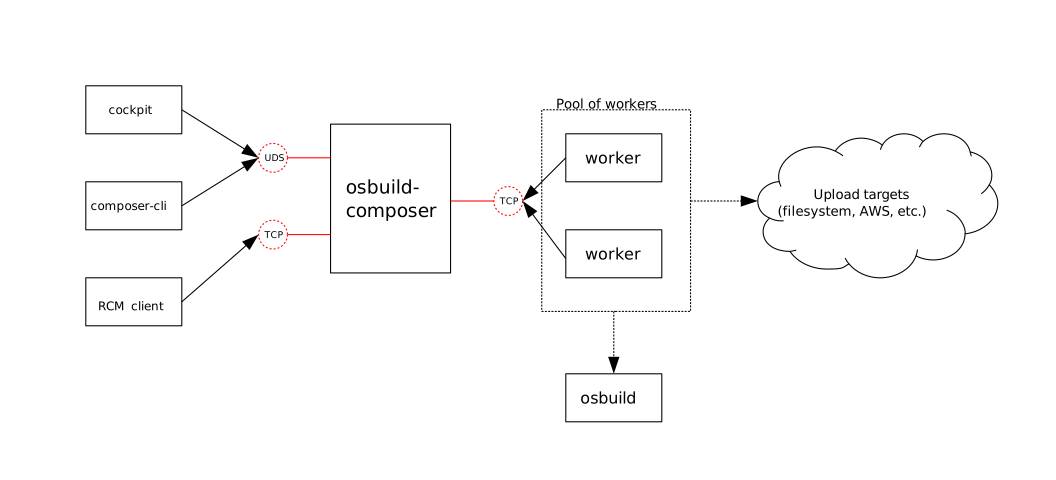
Frontends
osbuild-composer is meant to be used with 2 different front-ends. The primary one, which is meant for general use, is cockpit-composer. It is part of the Cockpit project and unless you have a strong reason not to use it, you should use it. composer-cli is a command line tool that can be used with osbuild-composer.
Compose
- Compose is what the user submits over one of the frontends
- It contains of one or more image builds
- It contains zero or more upload actions
Image build
- The resulting image has a type: https://github.com/osbuild/osbuild-composer/blob/master/internal/distro/fedora30/distro.go#L19
- Running build in osbuild-composer is referred to as a "job" (internal terminology, not related to end-user experience)
Job
- What composer submits to a worker
- Is a unit of work performed by
osbuild(internally it is a single execution ofosbuild) - Consists of one image build and zero or more Upload actions
Image type
- In the cockpit-composer, for examples these are image types:
- Openstack
- Azure
- AWS
- As of now, we name them internally by their file format: vhd, ami, etc.
- You can see a list of types by executing:
composer-cli compose types
Upload action
- Each image can be, but does not have to be, uploaded to a remote location
- One image can be uploaded to multiple locations